

For local governments
Get your website ready for the ADA Title II deadline
For towns, villages, counties, and school and special districts. A11yAudit finds the pages and PDFs on your site, flags what fails the accessibility standard the rule adopts, guides your team through the checks a computer can't make, and gives you a signed record of the work. No accessibility expertise needed.
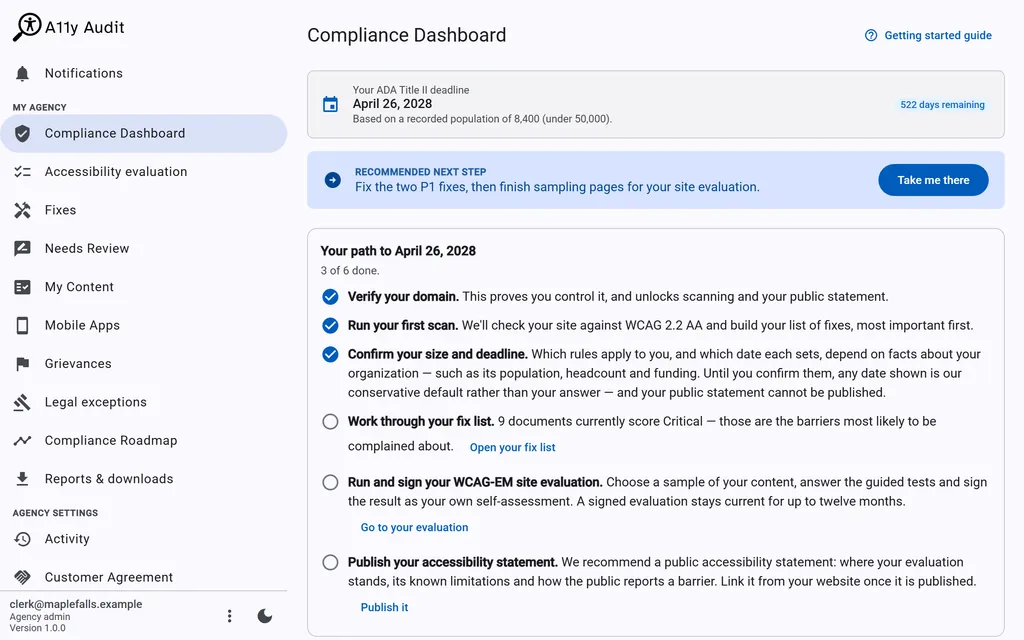
Title II deadline: April 26, 2027 if you serve 50,000 people or more; April 26, 2028 for smaller governments and special districts.
Free for 30 days. No card needed.
For local governments, the deadline is federal
The Department of Justice's ADA Title II rule sets WCAG 2.1 Level AA, the W3C's Web Content Accessibility Guidelines, as the standard for state and local government websites and mobile apps, with compliance phased in by population size. Entities serving 50,000 people or more fall under the earlier deadline; smaller entities and special district governments follow on a later one. The dates are set by federal rule and have moved before. A11yAudit shows the one that applies to you on your dashboard, and keeps it current if the rule changes.
A11yAudit holds your content to WCAG 2.2 Level AA, the newer version of the standard the rule names. The W3C states that content conforming to 2.2 also conforms to 2.1, so you work to one standard that covers both. Your web pages, your PDFs, and your mobile apps are all in scope, and all three can be part of your A11yAudit site evaluation.
Read the ADA Title II web rule, in plain English. If your organization also receives HHS funding, you may have an earlier Section 504 deadline.
What you get
A platform, not a spot-check
Your team logs in and works the whole job in one place — discovery, scanning, manual review, fixing, and the evidence at the end.
Your pages and documents, found for you
Verify your domain and A11yAudit crawls your site, building an inventory of the pages and documents it finds. If your site is bigger than a scan covers, it says so instead of going quiet.
Automated checks on pages and documents
Web pages are tested in a real browser, so what gets tested is the page your visitors actually get. PDFs are checked against PDF/UA, the accessibility standard for PDF files, and Word, Excel, and PowerPoint files are checked too.
A guided site evaluation
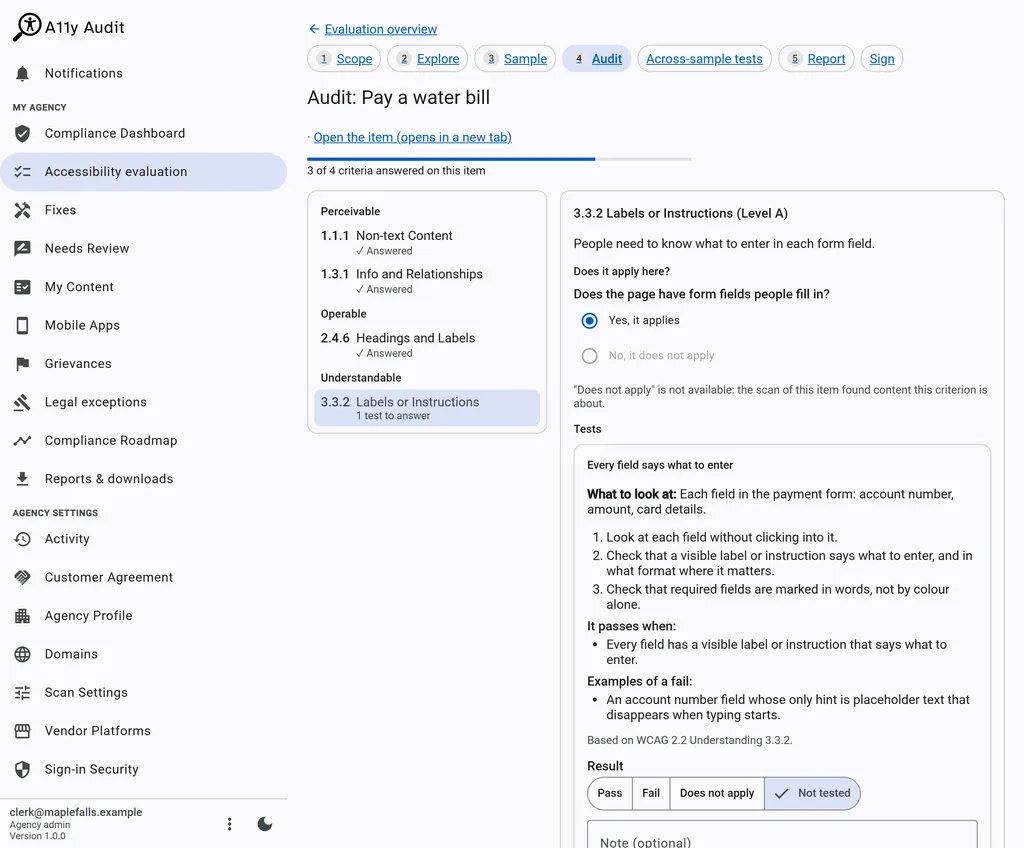
Meaningful alt text, logical reading order, keyboard traps: no engine can judge these. A11yAudit walks your team through the W3C's step-by-step evaluation method (WCAG-EM), with a guided test for every criterion — and never records a pass on a check it couldn't test.
Prioritized fixes and tracking
Fixes are ranked from 'fix first' down, by severity, reach, and effort, with step-by-step guidance for your CMS. Assign them, track them, and let a re-scan prove each one is done.
A signed evaluation record
Sign your completed evaluation as a site evaluation record that states, on its face, that it is your own self-assessment. Anyone you give it to can verify it without an account.
A conformance report from the record
A conformance report (ACR) in the standard VPAT® format that purchasing offices recognize, created from your signed record — so it says exactly what your evaluation found, criterion by criterion.
We tell you what we can't check
No scanner covers all of WCAG, and any tool that implies otherwise is selling you a green checkmark. Automated checks provide evidence on 16 of the 55 Level A and AA success criteria (the individual requirements) in WCAG 2.2. Every one of the 55 has a guided test in your site evaluation, answered by a person.
Nothing is quietly marked as passing. You can see the whole picture, criterion by criterion, on our WCAG coverage page — before you sign up.
For local governments
The public-facing side, handled
ADA Title II asks for more than a clean scan. A11yAudit covers the parts your residents and your legal team actually see.
Hosted accessibility statement
A public statement page drawn from your latest signed evaluation.
Grievance inbox
A public form for residents to report a barrier, tracked against a response target you set.
Public verification
Anyone holding your signed record can confirm it's authentic, without an account.
How it works
Your team drives it. A11yAudit runs what a machine can run, and guides you through what it can't.
Step 1: Point it at your site
Give A11yAudit a starting URL. It crawls from there, builds an inventory of the pages and documents it finds, and scans them as it goes, up to your plan's limit.
Step 2: See what the scan found
Results land mapped to the WCAG criterion they fail and ranked by priority, with the evidence and fix steps attached to each one.
Step 3: Work the manual review
For the checks no engine can decide, A11yAudit guides your team through a site evaluation — keyboard, screen reader, reading order — and records each answer.
Step 4: Fix, re-scan, and prove it
Track each fix and let a re-scan verify it. When you need to show your work, sign your evaluation record and hand over the conformance report created from it.
Questions
Does this make us compliant?
No tool can. A11yAudit finds failures, guides your fixes and manual checks, and gives you a signed record of what you evaluated. Meeting the standard comes from the work your team and vendors do.
What does A11yAudit do, and what do we do?
A11yAudit finds your pages and documents, scans them, ranks the fixes, and confirms each fix with a re-scan. Your team works through the guided evaluation (one test for each of the 55 WCAG criteria, on a sample of your pages), makes fixes in your website system or passes them to your vendor, and signs the record. How long that takes depends on the size of your site and how much needs fixing.
A vendor runs our website. Can we still use it?
Yes. You don't need access to your website's code. Copy any fix as a ticket for your vendor, or send them the list as a spreadsheet, and the next scan confirms what they've fixed.
How do we show the website is ours?
You verify your domain once. Any one of these works: an email to webmaster@ or another administrative address at your domain; for a .gov domain, an email to the contact in the .gov registry; a DNS record; or a small file or tag your web vendor adds to the site.
Ready to see where you stand?
Sign up and point A11yAudit at your site. It crawls your pages and PDFs, shows you what it found against WCAG 2.2 Level AA, and is straight with you about what still needs a human and what it didn't reach.